The M&L technology approach
LPR & Access Control Relay
Automatically trigger barriers, turnstiles and doors for configurable durations based on authorization decisions from LPR or access control software.
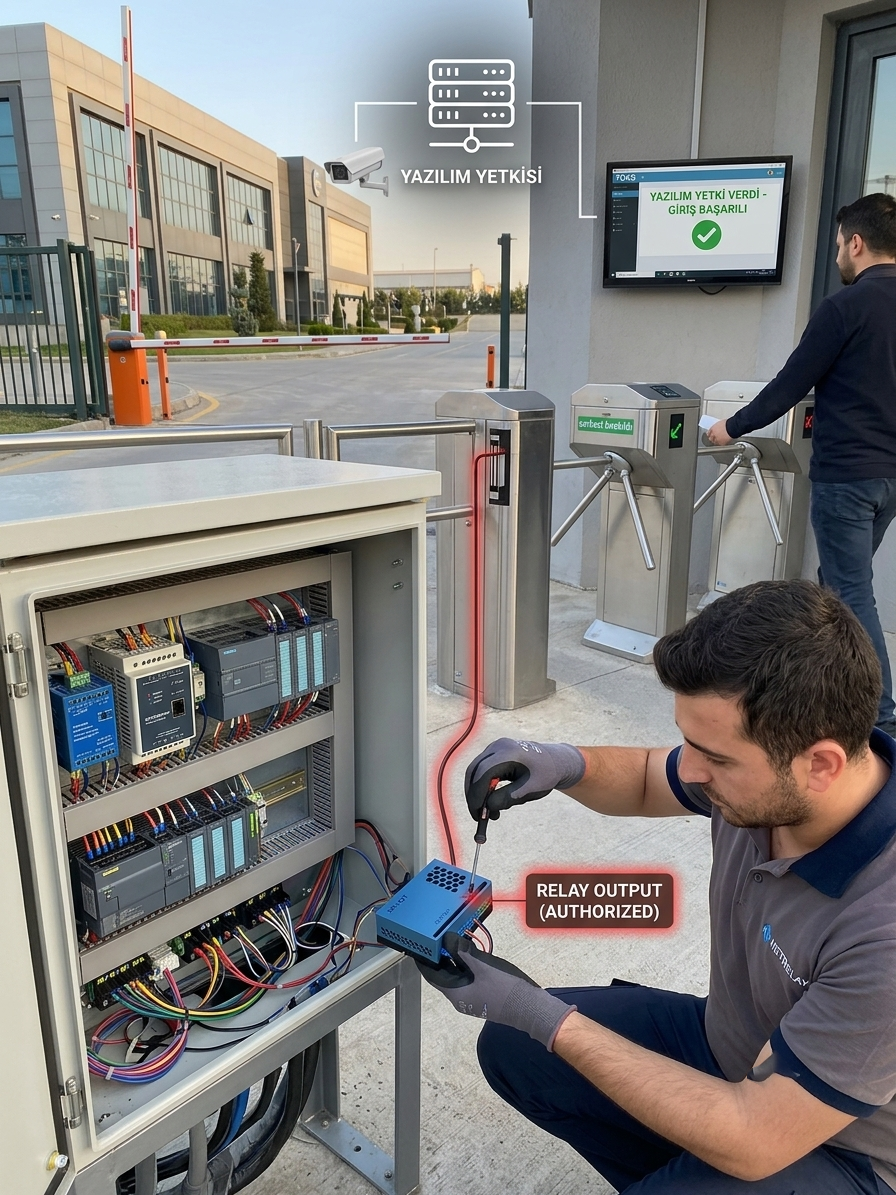
Your Software Authorizes. NetRelay Executes the Physical Access.
NetRelay provides a programmable I/O layer between license plate recognition, workforce attendance, personnel access and visitor management applications and physical barriers, turnstiles and doors.
Your software makes the authorization decision. NetRelay converts that decision into a physical relay action to open a barrier, release a turnstile or trigger an access-control input.
Trigger the Barrier for One Second After Plate Authorization
The LPR application identifies the license plate and checks it against its authorization database. When access is approved, the application sends a command to NetRelay.
NetRelay can activate the corresponding relay for one second, providing a dry-contact pulse to the barrier controller. The relay automatically returns to its normal state when the configured duration expires.
Example LPR Workflow
1. The vehicle enters the camera's field of view.
2. LPR software detects the license plate.
3. The application verifies access authorization.
4. An opening command is sent to NetRelay when access is approved.
5. NetRelay activates the barrier relay for one second.
6. The relay automatically returns to its inactive state.
7. The access event can be recorded in the central system.
Configurable Relay Pulse Duration
Different barriers, turnstiles and access controllers may require different pulse durations. Relay activation time can therefore be configured according to the requirements of the connected equipment.
Optional Delayed Activation
An optional delay can be introduced between authorization and physical relay activation. For example, the system can wait two seconds after plate authorization and then activate the barrier relay for one second.
Example Relay Rule
Trigger: Access approval from LPR software.
Optional delay: Configurable.
Action: Activate RELAY1.
Pulse: 1 second.
Final state: RELAY1 automatically returns to inactive.
Turnstile Control with Workforce Access Systems
The same architecture can be used for personnel access control. After an employee is authenticated by card, QR code, face recognition or another method, the workforce access application verifies whether the person is authorized for the access point.
If access is approved, NetRelay triggers the turnstile relay for the configured duration.
Your access system authorizes the user; NetRelay physically releases the turnstile.
Door and Lock Control
NetRelay can also be integrated with suitable electric door and access-control systems. After authorization, a relay pulse can be sent to the door controller according to the required activation duration.
Multiple Access Points from One NetRelay
Different relay outputs can be assigned to separate access points.
- RELAY1: Vehicle entrance barrier
- RELAY2: Vehicle exit barrier
- RELAY3: Personnel turnstile
- RELAY4: Controlled door
Receive Physical Feedback
Digital inputs can monitor suitable status contacts from barriers, turnstiles and doors. Barrier position, vehicle-loop detectors, turnstile passage contacts and door magnetic contacts can become part of the central access-control workflow.
Verify That the Barrier Actually Opened
Professional access systems may require more than confirmation that a relay command was sent. Physical feedback can verify whether the requested movement actually occurred.
If an open-position signal is not received within the configured time after the command, central software can generate a fault alert.
Verify the Actual Vehicle Passage
Vehicle-loop detectors or suitable presence sensors can confirm that the vehicle actually passed after the barrier was opened, allowing physical passage events to be recorded separately from opening commands.
Record Personnel Access Events
Authorization, relay activation and physical turnstile feedback can be associated with the same event record.
- Employee or user
- Access point
- Authorization time
- Authorization result
- Relay trigger time
- Physical passage time
- Entry or exit direction
No Relay Trigger for Unauthorized Requests
Authorization logic remains in your central application. If a vehicle or user does not have permission for the requested access point, no relay command is generated.
Time and Location-Based Authorization
Access policies can incorporate date, time, location and access-point information in addition to user or vehicle identity.
Access Reports
- License plate entry and exit history
- Employee access reports
- Turnstile passage counts
- Vehicle passages by barrier
- Unauthorized access attempts
- Out-of-hours access events
- Location-based access reports
- Relay activation history
- Command versus physical passage comparison
- Faulty or unresponsive access points
Add Physical Relay Control to Existing Software
NetRelay is not tied to a specific LPR or workforce access product. Applications developed with Python, Node.js, C#, VB.NET, Delphi, PHP and other technologies can integrate with NetRelay using API, MQTT and supported communication methods.
Your Software Decides. NetRelay Executes.
NetRelay does not replace your LPR or personnel access application. Your software identifies the vehicle or user and determines access rights; NetRelay performs the requested physical I/O operation.
Identify the plate or employee, validate access in your software and control the barrier, turnstile or door with a one-second or fully configurable NetRelay relay pulse.