The M&L technology approach
AI-Powered Area Intrusion Detection
We use artificial intelligence to monitor restricted and high-risk zones in standard IP camera feeds and detect unauthorized people, vehicles or objects in real time.
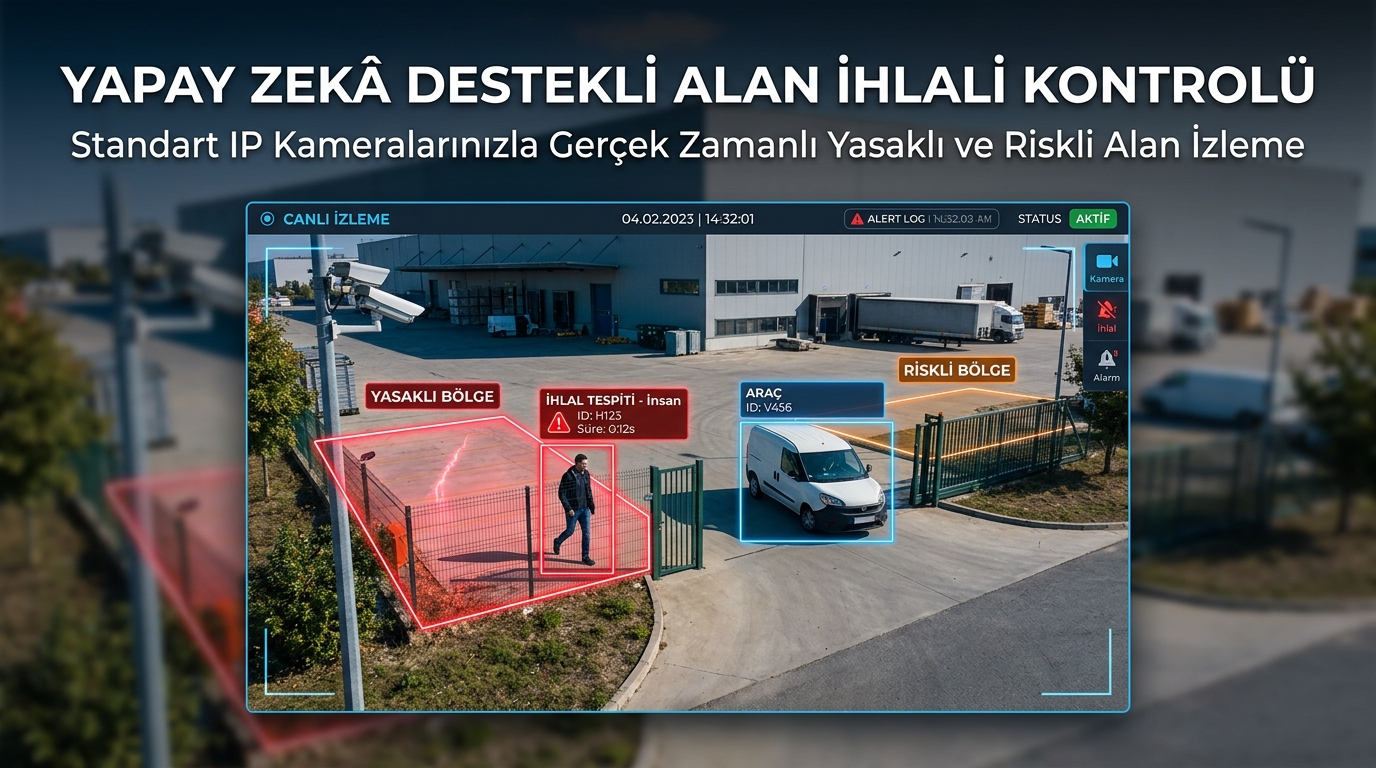
Monitor Restricted and High-Risk Areas Automatically with AI
The AI-Powered Area Intrusion Detection System developed by M&L Technology analyzes user-defined regions in standard IP camera feeds in real time.
One or more virtual zones can be drawn over the video. When a person, vehicle or another selected object enters these zones, the system can generate an intrusion event automatically.
The solution can be customized for private and commercial property security, factories, warehouses, occupational safety, machinery surroundings, parking facilities and indoor or outdoor areas.
While conventional camera systems often require continuous human monitoring, AI analysis helps bring only significant events to the operator's attention.
What Is Area Intrusion Detection?
Area intrusion detection generates an automatic alert when an unauthorized person, vehicle or object enters a predefined region in a camera feed.
The monitored area can be defined as a polygon, rectangle or another shape according to project requirements.
The AI model detects objects, tracks their movement and checks whether they intersect with the selected region.
Operation with Standard IP Cameras
The system can operate with standard IP security cameras providing suitable image quality.
When existing cameras are technically sufficient, their video feeds can be transferred to an AI analysis server without installing a separate camera infrastructure.
Resolution, viewing angle, mounting height, lighting, night performance, network connection and monitored-area size are evaluated before deployment.
User-Defined Virtual Zones
Users can mark the required monitoring area directly on the camera image.
Multiple restricted, safe or controlled zones can be created for each camera.
Machinery surroundings, forklift routes, warehouse entrances, loading areas, parking entrances and high-voltage areas can be defined separately.
Different object classes, alarm durations, schedules and notification rules can be applied to each zone.
Person Detection
The AI model can detect people in real time.
An intrusion alert can be generated when a person enters a restricted or hazardous region.
Different rules can be defined for touching the zone boundary, entering the complete area or remaining inside for a specified duration.
Vehicle Detection
Cars, trucks, forklifts, construction vehicles, motorcycles and custom vehicle classes can be detected.
Zones can be created where only vehicles are permitted or where vehicle access is prohibited.
A forklift entering a pedestrian route, a vehicle moving in the wrong direction or parking in a restricted zone can generate alerts.
Object-Based Zone Control
The system is not limited to people and vehicles.
AI models can be trained for pallets, boxes, sacks, barrels, containers, carts, machine components and other business-specific objects.
An alert can be created when an object is placed in an area where it should not be present.
Examples include blocked fire exits, emergency routes and corridors.
Real-Time Object Tracking
Each detected object can receive a temporary tracking identity.
The system can monitor movement direction, entry time, duration inside the zone and exit time.
Waiting and tracking rules can reduce repeated alarms for the same person or vehicle.
Occupational Health and Safety Applications
The system can support occupational safety by detecting uncontrolled entry into hazardous machinery and production areas.
Robot cells, presses, conveyors, cranes, high-temperature areas, chemical processes and high-voltage zones can be marked as virtual safety regions.
When a person enters while machinery is operating, the operator can receive an alert.
The system does not replace certified machinery-safety systems and should be used as an additional visual monitoring and early-warning layer.
Machinery-Surrounding Safety
Zones requiring authorized personnel can be defined around production machinery.
A PLC or NetRelay device can provide the machine-running state so monitoring becomes active only while the machine operates.
Warning lights, sirens and operator-screen alerts can be activated after an intrusion.
Robot Cell Monitoring
Industrial robot working areas can be defined as virtual zones.
A visual alarm can be generated when a person enters the robot area or crosses the safety boundary.
Door sensors, safety relays and PLC information can be evaluated together with camera analysis.
Forklift and Pedestrian Route Separation
Forklift paths and pedestrian routes can be defined as separate regions.
An alert can be generated when a forklift enters a pedestrian zone or a worker remains on a vehicle route.
People and vehicles approaching the same area can also be evaluated as a risk event.
Warehouse Security
Warehouse entrances, loading areas, high-rack zones and restricted sections can be monitored.
Human or vehicle entry outside working hours can generate an alarm.
Blocked corridors and emergency exits can be detected using pallet and box recognition.
Parking Area Monitoring
Parking entrances, disabled spaces, fire lanes, loading zones and reserved spaces can be defined as virtual regions.
Unauthorized vehicles, excessive waiting and blocked entrances can generate alerts.
License plate recognition can apply separate rules to authorized and unauthorized vehicles.
Door and Entrance Monitoring
Warehouse, facility, building and technical-room entrances can be monitored through camera-based intrusion detection.
An event can be recorded when a door opens or a person crosses a virtual line.
Card-access and turnstile integration can identify entry without a valid access record.
Indoor and Outdoor Operation
The system can operate in parking facilities, warehouses, production sites, building interiors, open land and facility perimeters.
Sunlight, rain, shadows, fog, vegetation movement and night lighting are evaluated for outdoor applications.
Reflections, shelf occlusion, moving machinery and dense human traffic are considered for indoor use.
Day and Night Operation
With suitable cameras and lighting, the system can operate during both day and night.
Low-light, night-vision and infrared-supported cameras can be used in dark areas.
The AI model should be tested with real field images from daytime and nighttime conditions.
Virtual Line Crossing
A virtual line can be created in addition to area monitoring.
An event can be recorded when a person or vehicle crosses the line.
Direction-based control can generate alarms only for selected entry or exit directions.
Direction Control
Object movement can be analyzed to identify wrong-way events.
Examples include vehicles entering through an exit, movement against a one-way corridor and entry through an emergency exit.
Loitering Detection
The system can monitor not only zone entry but also how long a person, vehicle or object remains inside.
An alert can be generated for a vehicle waiting too long in a loading zone or a pallet blocking an emergency exit.
Abandoned Object Detection
Objects placed inside a zone and remaining stationary can be detected.
Rules can be prepared for bags, boxes, pallets, packages and custom objects.
Removed Object Detection
The system can check whether required equipment or objects have been removed from a defined location.
An alert can be generated when a fire extinguisher, equipment box or material pallet is no longer present.
Occupancy and Person-Count Control
The number of people inside a zone can be monitored in real time.
An alert can be generated when the defined capacity is exceeded.
Authorized and Unauthorized Person Classification
Authorization scenarios can be developed through access cards, uniforms, helmet colors or facial recognition.
Entry by users outside an authorized group can generate an alert.
Projects using biometric data must address applicable privacy and data-protection obligations.
Personal Protective Equipment Detection
Area intrusion analysis can be combined with helmet, reflective vest and other protective-equipment detection.
An alert can be generated when a worker enters a hazardous area without the required equipment.
Alarm and Notification Management
When an intrusion is detected, the platform can create an alarm record and notify selected users.
Notifications can be delivered through the web dashboard, email, SMS, mobile applications and custom communication platforms.
Messages can include facility, camera, zone, object type, date and time.
Automated Telephone Calls
Critical intrusion events can trigger automatic telephone calls to responsible personnel.
If the first user cannot be reached, the alarm can be escalated to additional users.
Alarm Levels
- Information
- Pre-alarm
- Unauthorized entry
- Occupational-safety violation
- Critical zone intrusion
Each level can create a record, send notifications or activate field equipment.
Event Image and Video Recording
An image can be stored automatically when an intrusion occurs.
A video clip covering a selected period before and after the event can also be created.
Camera, zone, object class, entry time, exit time and alarm result can be associated with the record.
Live Monitoring
Authorized users can watch cameras through a web-based interface.
Detected people, vehicles and objects can be shown using boxes or masks.
Restricted and safe regions can be displayed directly over the video.
Centralized Management Dashboard
Multiple cameras, facilities and alarm records can be managed through one platform.
Camera connectivity, active alarms, last intrusion time and system-health information can be displayed.
Users can filter by facility, camera, region, object type, date and alarm result.
Multi-Camera Management
Multiple video feeds can be analyzed through one AI server.
Cameras can be grouped by factory, branch, building, department and risk level.
Different zones, object types, alarm durations and operating schedules can be configured for every camera.
Multi-Site Management
Facilities in different cities or regions can be monitored through the same centralized platform.
Site users can be restricted to their own camera and alarm records, while central administrators view all facilities.
Operating Schedule
Zone monitoring can be activated according to selected days and hours.
Movement considered normal during working hours can be treated as an intrusion outside business hours.
Reducing False Alarms
Shadows, reflections, animals, vegetation, rain, fog and camera vibration may create false alarms.
The system can be tested and improved using real field images.
Rules such as minimum visibility time, zone-entry percentage and direction confirmation can be applied.
Animal and Person Classification
Cats, dogs, birds and other animals can be separated from people in outdoor areas.
Separate animal alerts can also be defined when required.
Camera Sabotage and Video Loss
Camera movement, lens obstruction, frozen images and connectivity loss can be monitored.
A technical alarm can be generated when no usable image is received for a defined period.
NetRelay IoT Integration
When an intrusion occurs, commands can be sent to NetRelay through HTTP, MQTT, WebSocket or TCP.
Sirens, warning lights, door locks, barriers and auxiliary devices can be controlled through NetRelay relays.
Door contacts, emergency buttons, machine states and sensors can be collected through digital inputs.
PLC Integration
Intrusion results can be transferred to PLC platforms.
Machine operation, production mode, safety-door and shift information can be collected from the PLC.
An entry considered normal while machinery is off can be treated as critical while it is operating.
Safety-critical machinery shutdown must be implemented through certified safety PLCs and appropriate equipment.
SCADA and MES Integration
Area-intrusion events can be displayed within SCADA and MES platforms.
Event time, camera, region, person and vehicle information can be associated with production and machine records.
Access-Control Integration
Card-access information can be combined with camera analysis.
When a person enters, the system can check whether a valid card event exists.
Tailgating can be evaluated when additional people enter using a single card authorization.
License Plate Recognition Integration
Vehicle intrusion detection can be combined with license plate recognition.
Authorized vehicles can access selected zones while unknown and prohibited vehicles generate alerts.
Turnstile and Barrier Integration
Turnstiles and barriers can be controlled after authorized person or vehicle detection.
Barriers can remain closed while unauthorized events are reported to security personnel.
AI Model Training
Images of people, vehicles and custom objects can be collected from different angles and operating conditions.
Day, night, rain, shadows, crowding and partial occlusion can be included in the training dataset.
On-Premise Deployment
The system can run on a local server when camera feeds should not leave the facility.
Video analysis, alarm generation and recording can be performed inside the local network.
Cloud and Hybrid Deployment
Cloud or data-center infrastructure can be used for centralized management of different sites.
In hybrid deployments, video analysis runs locally while alarms and reports are transferred centrally.
User and Permission Management
Roles can be created for administrators, security personnel, occupational-safety professionals, technical teams and read-only users.
Each user can be restricted to selected facilities, cameras and alarm records.
Event Approval and Response Workflow
Security personnel can mark an alarm as a real intrusion or false event.
Statuses such as response started, inspected and closed can be defined.
The time between detection and response can be reported.
Reporting and Analytics
Intrusion events can be reported daily, weekly and monthly.
Reports may include facility, camera, zone, object type, date, time, duration and user response.
Locations, periods and shifts with the highest number of violations can be displayed through charts.
Example Factory Application
The region around a press machine is marked as a restricted zone.
The running state is collected from the PLC. When a person enters while the machine is operating, a critical alert is generated.
The event image is stored, the operator interface displays a warning and a warning light activates through NetRelay.
Example Warehouse Application
Forklift and pedestrian routes are defined as separate zones.
An alert is generated when a forklift enters the pedestrian area or a worker remains on the vehicle route.
Example Parking Application
Fire lanes and disabled parking spaces are defined as virtual zones.
An alert is generated when an unauthorized vehicle enters or remains longer than the allowed duration.
Example Facility-Perimeter Security
Fence lines and critical zones around the building are monitored through cameras.
Human or vehicle entry outside working hours generates an alarm for the security center.
Frequently Asked Questions
Does the system work with standard IP cameras?
Yes. Standard IP cameras with suitable resolution, viewing angle and streaming capability can be used. Existing cameras are evaluated before deployment.
Can we define the monitored area ourselves?
Yes. One or more areas can be drawn through the user interface, with separate object and alarm rules for each zone.
Does it detect only people?
No. People, cars, trucks, forklifts, motorcycles and custom objects can be detected.
Can it work at night?
Yes. Night operation can be provided through suitable cameras and lighting. Actual performance is confirmed through field testing.
Can notifications be sent after an alarm?
Yes. Alerts can be delivered through the web interface, email, SMS, automated calls and mobile applications.
Can it activate a siren or warning light?
Yes. Auxiliary equipment can be controlled through NetRelay, PLC or another appropriate control platform.
Can it replace a machinery-safety system?
No. Camera-based intrusion detection does not replace certified safety relays, safety PLCs, light curtains and physical guards. It should be used as an additional monitoring and early-warning layer.
Measurable Success Indicators
- Continuous monitoring of restricted and high-risk zones
- Real-time detection of people, vehicles and objects
- Reduced continuous-screen monitoring workload
- Visual recording of occupational-safety violations
- Detection of forklift and pedestrian route violations
- Identification of blocked emergency exits and corridors
- Faster detection of after-hours unauthorized entry
- Automatic alarm and notification delivery
- Integration with PLC, SCADA, access-control and NetRelay systems
- Central management of multiple cameras and facilities
- Measurement of incident-response times
- Reporting by department, shift and zone
Why AI-Powered Area Intrusion Detection?
Conventional camera systems record events but often require continuous human monitoring.
AI-powered analysis evaluates people, vehicles and objects automatically and focuses attention on events relevant to the business.
The ability to use existing IP cameras, adjust virtual zones and integrate with automation platforms provides a flexible security and occupational-safety solution.
Important Safety Notice
The AI-Powered Area Intrusion Detection System must not replace certified occupational-safety and machinery-safety systems.
It should be considered an additional visual monitoring, recording, alarm and early-warning layer.
Machinery shutdown, emergency isolation and other safety-critical functions must be implemented through equipment compliant with applicable standards.
An Area Intrusion Detection Project Customized for Your Business
Every organization has different camera infrastructure, risk zones, operating hours, monitored objects and alarm procedures.
Before implementation, camera positions, restricted zones, object classes, operating schedules, false-alarm sources and integration requirements are analyzed.
A pilot can begin with selected cameras and areas. After person and vehicle detection, zone rules, false-alarm rate and notification performance are validated, the system can be expanded across the complete facility.
For detailed information, visit the AI-Powered Area Intrusion Detection project page.
Community
Comments and questions
Nothing has been published yet.